Daily Nanny
- 3.4
- Rating
- 10.00K
- Installs
- Free
- Price

 Analysis by App-foxy
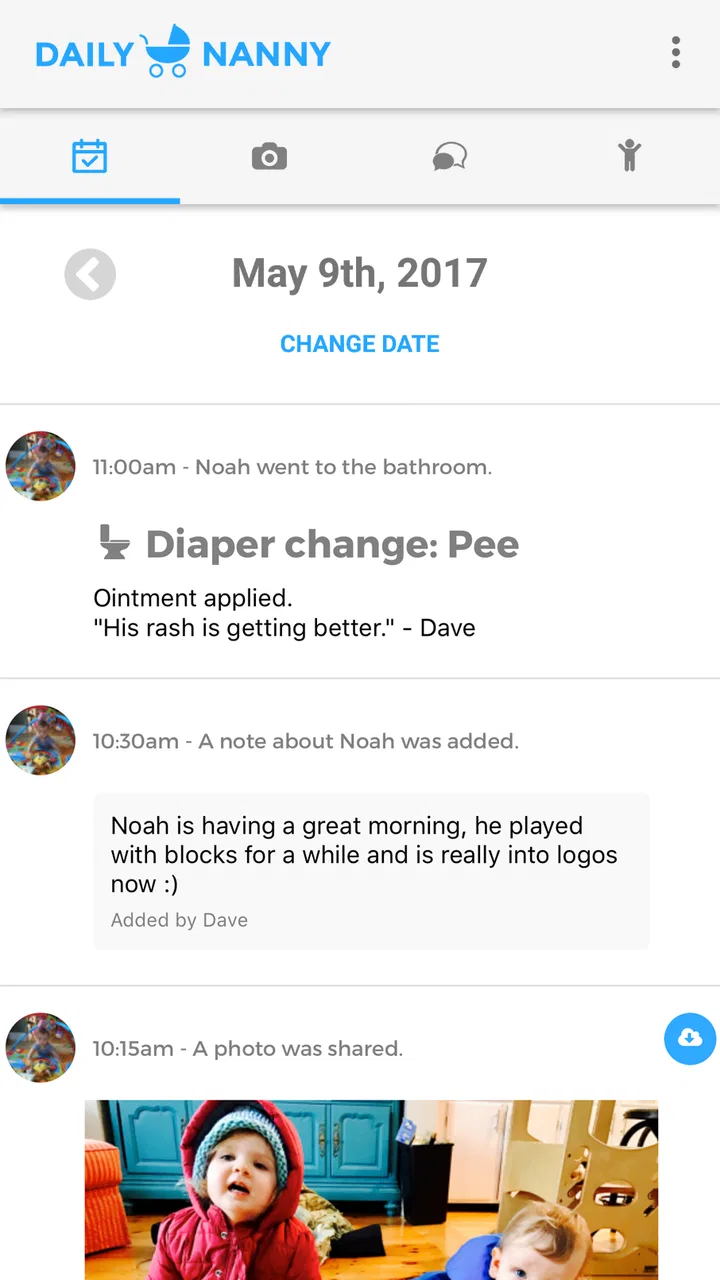
When a child moves between a parent’s home and a nanny’s care, the difficult part is often not the big events. It is remembering the small details: what was eaten, when a nap ended, whether a supply is running low, or what needs attention later. Daily Nanny is a communication app built around that everyday handoff. I found its appeal in the simple idea of keeping parents and nannies connected in one shared place instead of scattering updates across text messages, paper notes, and memory.
That focus makes it different from a general messaging app. It is not trying to become a social network, a full calendar, or a replacement for every childcare tool. Its value is narrower and more practical: creating a routine for sharing information about a child’s day. The app is free to install, suitable for Everyone, and comes from developer Dave Coffin. Its current version is 7.6.0, and it runs on Android 7.0 or later.
I would recommend approaching it as a communication notebook rather than expecting a large, highly automated childcare platform. The best experience comes when both sides agree to use it consistently. If only one person records updates while the other continues using ordinary texts, the benefit drops quickly. Used as a shared habit, though, it can make the daily transition calmer and less dependent on hurried conversations.
You May Also Like

 Blood Strike: 2.5 Anniversary
Blood Strike’s Loadouts Turn Every Drop Into a Tactical Gamble
A close look at Blood Strike’s custom loadouts: how fast access to signature weapons reshapes its battle royale rhythm, rewards preparation, and narrows the gap between fights.

 Pandora - Music & Podcasts
Pandora’s Music Is Easy to Start, but Harder to Recover
Pandora’s strength is its low-effort path from a seed to a station. Its weak spot is how much confidence it asks you to place in connection, setup, and quiet recovery.

 8 Ball Pool
 Is Built on Rivalries, Rematches, and Routine
A close look at the rivalries, rematches, shared routines, and unanswered safety questions that turn a quick pool match into a persistent mobile community.

 Samsung Music
’s Quiet Strength Is Playing What You Already Own
Its reach comes less from spectacle than from dependable access to a personal library. That simplicity is both the app’s strongest retention engine and its ceiling.

 AccuWeather: Weather Radar
AccuWeather Review: A Quick, Clear Forecast for Everyday Decisions
For everyday plans, the best forecast is the one you can understand quickly. AccuWeather makes rain timing, radar, and local conditions easy to act on, with a few trade-offs.

 Hill Climb Racing
Why Hill Climb Racing Still Turns Crashes Into One More Run
A tiny car, a bumpy hill and one more upgrade: Hill Climb Racing keeps resurfacing because its simple chaos makes every near-miss feel personal.
More From Our News Desk
View All News


How a normal childcare day fits into the app
I’d use this section to think through the handoff as a sequence, not a stream of phone checks: agree on a few natural moments for recording meals, rest, and anything out of the ordinary. That makes the app easier to keep up with while the nanny stays focused on the child. Next, I’d look at the small setup checks that help both caregivers start from the same place.
Start with a shared handoff routine
The most useful way to begin is to decide what belongs in Daily Nanny and what does not. I would keep the app for information that the other caregiver may need to refer back to: meals, rest, activities, notable moods, reminders, and practical observations. Urgent matters should still be communicated directly rather than waiting for someone to open the app.
This distinction sounds obvious, but it prevents a common problem with shared communication tools: too many updates become noise. A short, consistent note is usually more useful than a long account of every moment. For example, a nanny might record that lunch was offered, the child ate part of it, and a nap followed shortly afterward. A parent can then understand the rhythm of the day without searching through a conversation thread.
I also found that the handoff works best when it happens at predictable moments. A quick update after a meal, another after rest, and a final summary before pickup create a reliable record without requiring constant phone use. That pattern is more sustainable than trying to document everything in real time.
A realistic weekday example
Imagine a parent leaving in the morning while a nanny takes over care. Instead of discussing every detail at the door, the parent can mention anything unusual face to face and leave the ordinary daily tracking to the app. During the day, the nanny adds the important observations as they happen. Before pickup, the parent can review the day and ask focused questions rather than starting from zero.
The same workflow helps when a grandparent or another approved caregiver is involved for part of the day, provided the people using the app agree on how updates should be handled. The strength is not that the app magically coordinates everyone. The strength is that it gives a shared routine a consistent home.
There is also a useful emotional benefit. Parents who are away during the day may feel more connected when updates arrive in an organized way, while nannies spend less time repeating the same information verbally. That does not remove the need for conversation, but it can make the conversation more meaningful.
Keep entries useful rather than exhaustive
My practical advice is to write notes that answer the next caregiver’s likely question. “Ate lunch” is better than silence, but “ate some lunch and drank water” gives more context. At the same time, turning every update into a detailed report can make the process tiring and eventually lead to skipped entries.
A good habit is to record exceptions more carefully than ordinary events. If the day followed its usual pattern, a compact note is enough. If the child slept unusually little, refused a familiar food, or seemed different from normal, that deserves clearer wording. This makes the record more valuable without creating unnecessary work.
What the app is not designed to replace
Daily Nanny should not be treated as an emergency channel, a medical decision tool, or a substitute for direct discussion about serious concerns. If a child is ill or there is an immediate safety issue, the responsible adult should communicate directly and follow appropriate professional advice. The app is better suited to routine coordination and continuity.
It is also not the best choice for families who need a complete childcare administration system. If your priority is payroll, formal scheduling, extensive task assignment, or a broad family calendar, a dedicated service in that area may be a better fit. Daily Nanny’s appeal comes from keeping the communication problem focused.
Settings and habits worth checking first
Before relying on the app, I would spend a little time reviewing its available settings and making sure the people involved understand the basic workflow. The exact options you see can depend on the device and app version, but the principle is stable: remove avoidable friction before the first busy day.
First, make sure notifications behave in a way that suits your routine. Too many interruptions can make a caregiver ignore them, while too few can delay an important update. I prefer notifications that bring attention to new information without encouraging people to check the phone constantly. If a caregiver is working, driving, or supervising a child closely, the app should support attention rather than compete with it.
Second, check how information is organized and decide on a shared writing style. If one person uses short factual notes and another writes long narratives, reviewing the record becomes harder. Agreeing on simple labels or a consistent order—food, rest, activities, concerns—can make entries easier to scan even without elaborate customization.
Third, confirm that everyone knows which account or shared space is being used. Communication apps often fail in practice because one person is looking at an old conversation, a different profile, or an incomplete setup. A short test entry before the first real handoff can reveal this problem early.
Finally, review the app after an update rather than assuming every setting remains exactly where you remember it. Daily Nanny has reached version 7.6.0, so keeping the application current is sensible, especially when more than one caregiver depends on the same workflow. I would still avoid changing several settings at once; if something feels different, it is easier to identify the cause when adjustments are deliberate.
Use repeatable shortcuts without overcomplicating the day
The fastest users are not necessarily the ones who type the most quickly. They are the ones who decide in advance what deserves an entry. A short checklist in your own routine can help: meal, rest, mood, activity, and anything unusual. This is not an extra feature that needs to be built into the app; it is a personal method for using the communication space consistently.
Another useful shortcut is to write updates immediately after a natural transition. After clearing away lunch, record the meal. After the child wakes, record the rest period. After an outing, add the activity while the details are still fresh. This is more reliable than waiting until the end of the day and trying to reconstruct events from memory.
I would also avoid sending several tiny messages when one clear update will do. A sequence of fragments can be harder for a parent to interpret than a compact summary. On the other hand, do not delay a time-sensitive concern just to make the note look tidy. Good communication favors clarity over perfect formatting.
For parents, a helpful habit is to review the app before asking routine questions at pickup. That lets the conversation focus on anything unclear or important. For nannies, a final end-of-day summary can reduce repeated explanations, particularly when the child’s day included several ordinary transitions.
Where the simple approach starts to show limits
The app’s focused design is both its strength and its main limitation. A shared communication record can improve continuity, but it cannot resolve disagreements about care routines. If parents and nannies have different expectations about what should be recorded, the tool may expose that mismatch rather than fix it.
There is also a trade-off between convenience and completeness. Recording more information creates a richer history, but it takes more time and may encourage caregivers to use their phones too often. Recording less keeps the routine manageable, but important context can disappear. I would choose a middle path: document recurring care information and unusual events, while leaving minor details out.
Another limitation is that the app depends on participation. A parent who rarely checks updates may not receive the practical benefit, even if the nanny uses it carefully. Likewise, a nanny who finds the process cumbersome may fall back to verbal updates. The app works best when both sides agree that it is the default place for routine information.
Its average rating is 3.4 from around 131 ratings, with around 60 written reviews, so I would approach it as a specialized tool with a mixed reception rather than an automatic recommendation for every household. That does not tell me how it will fit your particular routine, but it does reinforce the need to test the workflow with the people who will actually use it.
Free access and the role of optional purchases
Daily Nanny is free, which makes it relatively easy to try without committing money at the start. There are in-app purchases ranging from $4.99 to $39.99 per item, so I would check what an optional purchase changes before paying. A useful rule is to use the free experience long enough to see whether the shared habit is actually working.
That matters because no paid option can compensate for an unclear routine. If caregivers are not entering updates, or if the family prefers ordinary conversation, spending more will not solve the underlying issue. If the app becomes part of the household’s daily process, then it is reasonable to evaluate optional purchases based on the specific convenience they provide rather than assuming they are necessary.
How it compares with ordinary messaging
Text messaging is more familiar and usually faster for urgent communication. Most people already know how to send a message, and it does not require introducing a separate routine. For a family that only needs occasional updates, ordinary messaging may be enough.
Daily Nanny becomes more appealing when the same childcare information is repeated every day. A general chat can mix meal notes with unrelated conversation, making it harder to review the child’s routine later. A focused app gives that communication a clearer purpose and may reduce the chance that an important update is buried.
The trade-off is that a separate app requires cooperation. Messaging wins on familiarity; Daily Nanny wins when the family values a dedicated childcare record. I would choose the app for regular parent-and-nanny coordination, but stick with messaging for occasional babysitting or urgent matters.
How it compares with broader family and childcare platforms
Some larger childcare platforms offer wider administration features, such as scheduling, billing, formal reports, or extensive planning tools. Those services may suit professional arrangements that need more than daily communication. They can also bring more setup and a steeper learning curve.
Daily Nanny is more attractive when the goal is modest: keep parents and nannies informed without turning childcare into a project-management system. The narrower scope can feel refreshing, especially for a small household that wants fewer moving parts. The downside is that families with complex schedules may quickly outgrow it.
My decision rule is simple. Choose this app when the main problem is missed or scattered daily updates. Choose a broader platform when the main problem is managing schedules, payments, multiple responsibilities, or formal records. Choosing based on the real problem prevents disappointment.
Privacy-minded everyday use
Because childcare notes can contain personal information, I would keep entries practical and avoid adding details that do not help the next caregiver. There is no advantage in turning a routine update into a complete diary if a shorter note communicates what matters. Be especially thoughtful when recording information that could be sensitive or unnecessary for the people involved.
I would also establish a simple departure routine for caregivers who stop working with the family. Remove access or stop using the shared communication arrangement according to the way your household manages accounts. The important point is to treat the app as part of a real caregiving relationship, not as an isolated phone utility.
Who will get the most from it?
Daily Nanny is a good match for parents and nannies who exchange care every day and want a dedicated place for routine updates. It is particularly useful when work schedules make face-to-face handoffs short, or when several ordinary details need to be remembered later.
It can also suit people who prefer written continuity over relying on memory. A parent returning from work can review the day before asking questions, while a nanny can leave a concise account that supports a smoother evening transition. The value grows when the same information needs to be understood by more than one caregiver.
I would skip it if your arrangement is occasional, if everyone already communicates comfortably through one simple channel, or if you need extensive administrative features. I would also avoid making it the only method for urgent communication. Its best role is dependable routine coordination, not handling every possible childcare situation.
My verdict after building a repeatable workflow
Daily Nanny is a focused communication app that makes sense when the relationship between parents and nannies needs a shared daily rhythm. I like that its purpose is easy to understand: keep the practical story of a child’s day available to the people responsible for care. The app is free to begin with, rated for Everyone, and has passed the basic test of being available on older Android devices from version 7.0 onward.
Its limitations are also clear. It depends heavily on consistent participation, it may feel too narrow for families seeking a complete childcare management system, and a separate app is not automatically better than a familiar message thread. The optional purchases mean I would test the core routine before spending anything.
My strongest recommendation is to introduce it with a small agreement: what gets recorded, when updates are made, and which situations require a direct call or conversation. That agreement matters more than filling the app with constant notes. The real advantage is not more communication, but more reliable communication.
With that approach, Daily Nanny can become a quiet but useful part of the day: a place to preserve the details that help one caregiver take over from another. If that is the problem you are trying to solve, I think it is worth trying. If you need scheduling, billing, formal reporting, or emergency coordination, I would look elsewhere and keep this app out of a role it was not meant to fill.
Overall, Daily Nanny earns my recommendation for households that want a dedicated childcare handoff without the weight of a large platform. It is not a universal answer, but for the right parent-and-nanny routine, its focused communication approach can make everyday care easier to follow and easier to discuss.
FAQs for Daily Nanny
01What is Daily Nanny, and who is it designed for?
Daily Nanny is a childcare management app designed to help parents, guardians, and professional caregivers organize a child’s daily routine. It can be useful for recording meals, naps, diaper changes, activities, medication reminders, and other important details. Families sharing childcare responsibilities may also find it helpful for keeping everyone informed about the child’s schedule.
02What information can I record in Daily Nanny?
The app is intended to keep a practical record of everyday childcare information, such as feeding times, sleep periods, diaper changes, playtime, medication, and notes about the child’s mood or behavior. Depending on the version and device, available features may vary. Before relying on it for medical or emergency information, users should verify that the app supports the specific records they need.
03Can multiple caregivers use Daily Nanny to share updates?
Daily Nanny may be useful when several people care for the same child, including parents, grandparents, babysitters, and daycare staff. Shared updates can make handovers easier and reduce the chance of forgetting an important task. However, sharing capabilities, account requirements, invitations, and synchronization options can differ by platform or subscription, so review the current app description before downloading.
04Is Daily Nanny suitable for medical tracking or emergencies?
Daily Nanny can help organize routine information, reminders, and notes, but it should not replace professional medical advice, a doctor’s instructions, or emergency services. Parents should double-check medication details, dosages, allergies, and health records rather than relying only on an app entry. In an emergency, contact the appropriate local emergency service or healthcare professional immediately.
05Does Daily Nanny protect my child’s personal information?
Because childcare apps may contain sensitive information about children, parents should review Daily Nanny’s privacy policy before creating an account or entering data. Check what information is collected, how it is stored, whether it is shared with third parties, and how account deletion works. Use a strong password, keep the app updated, and avoid entering unnecessary identifying details whenever possible.
Pros
- Simple interface makes daily childcare tasks easy to organize.
- Useful reminders help parents keep track of routines and appointments.
- Can improve communication between parents and caregivers.
- Supports more consistent schedules for children.
- Convenient access to childcare information in one place.
Cons
- Some features may require a subscription or in-app purchase.
- The app’s usefulness depends on regular caregiver participation.
- Notifications could become excessive without careful customization.
- Limited compatibility with older phones may affect performance.
- Privacy settings should be reviewed before adding family information.

Daily Nanny
Gallery